Ellipsometry Results
This guide explains how to read the Psi and Delta ellipsometry results and judge how a stack changes polarization amplitude and phase.
You will learn how to use ellipsometry curves for thickness, refractive-index, and incidence-angle sensitivity analysis, together with R/T/A results to assess structural changes.
Analysis Entry
| Current results page | Method page |
|---|---|
one-parameter and two-parameter Psi / Delta sweeps | Ellipsometry Analysis |
joint reading with system-level R / T / A | RTA and Layer Absorption Analysis |
| multi-dimensional sweep organization | Overview |
Focus
This chapter covers three points:
- the availability conditions and physical meaning of
Psi / Delta - curve interpretation in single-run and
Sweepmodes - how curve changes map back to thickness, refractive index, and incident angle
Example Setup: 65° Coherent Ellipsometry Case
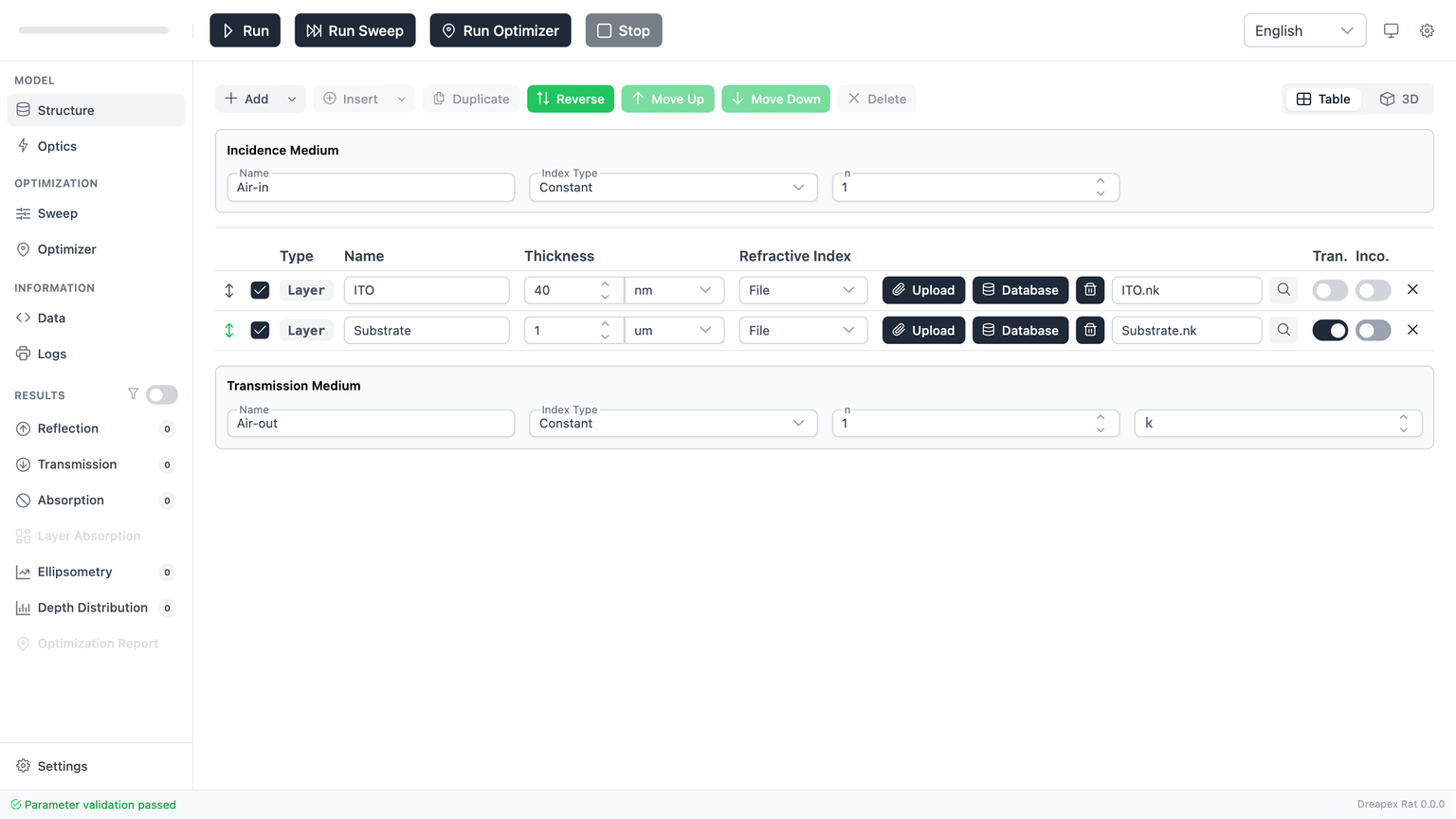
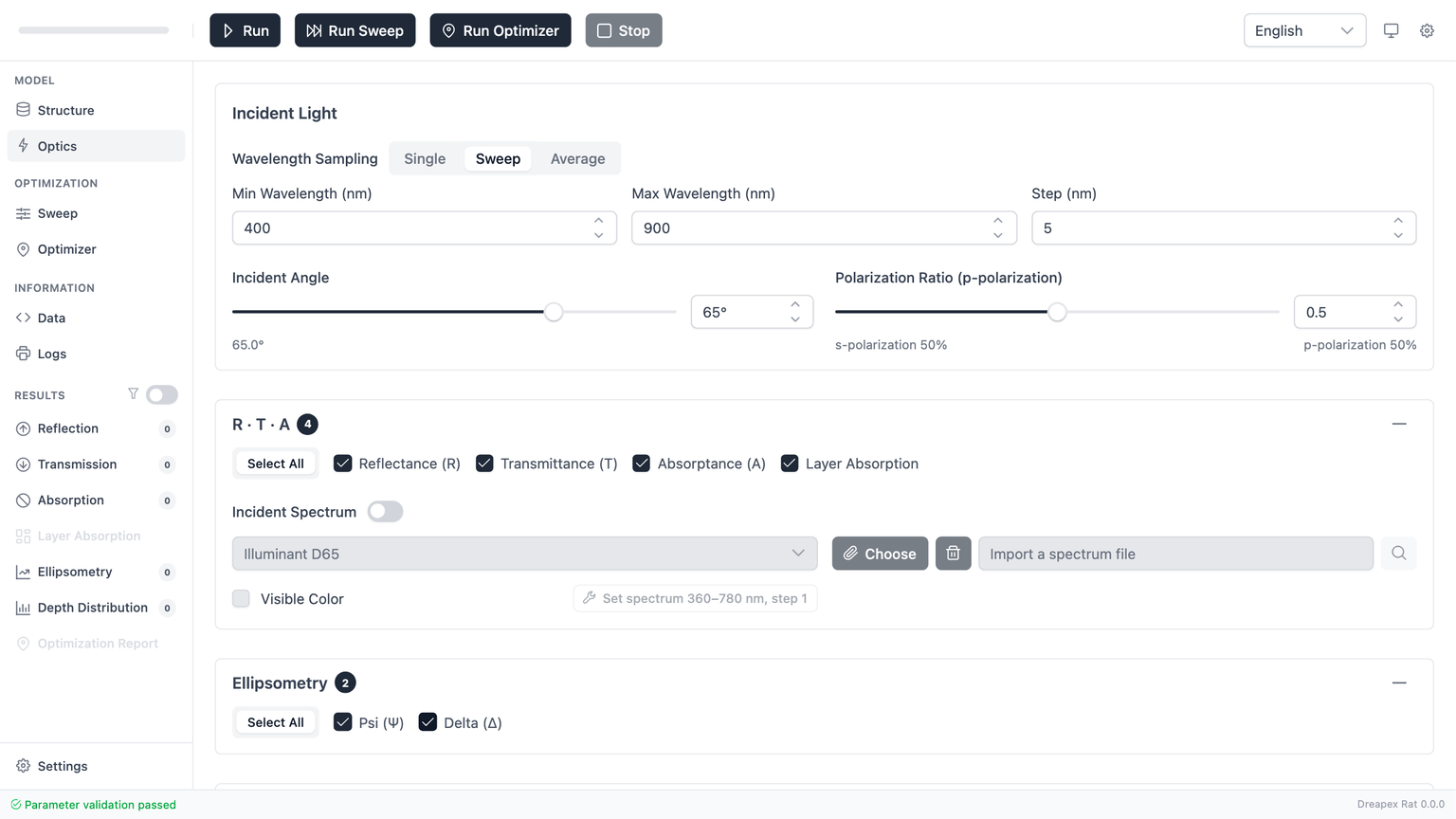
The screenshots in this chapter use a minimal “default ITO coating at 65° incidence” ellipsometry case. This keeps the built-in default structure while making the one change required to show why the stock model is not ellipsometry-ready and how to fix it.
This example uses:
- The default structure as the starting point, with no extra layers and no material-file replacement.
- One structural change in
Structure: turn offInco.for the second layer (Substrate) so every enabled layer is coherent. - The default wavelength-sweep settings in
Optics:400 -> 900 nm, step5 nm. Incident Angle = 65°. This is a much more realistic oblique-incidence setting for ellipsometry than0°, and it provides stronger parameter sensitivity.- Both
PsiandDeltaenabled in theEllipsometrydetector group. - The top-toolbar
Runbutton.
Availability conditions
The prerequisites here are stricter than for ordinary result pages.
The current implementation requires both of the following:
Psiand/orDeltamust be enabled in theOpticsdetector list.- Every enabled layer in the structure must remain coherent.
That “every layer must be coherent” rule applies to:
- top-level regular layers
- enabled layers inside a
Layer Group
If any enabled layer is marked Incoherent, the app raises a validation error and treats Psi / Delta as invalid.
The reason is physical: ellipsometry relies on coherent interference. Once part of the stack is switched to incoherent propagation, Psi / Delta no longer have the same clear interpretation, so the app blocks that configuration.
So when you see any of the following:
- a validation error before
Run Psi / Deltastaying disabled in the result treeNo dataon the result page
check for enabled incoherent layers first.
Physical interpretation of Psi and Delta
Ellipsometry is commonly written as the complex reflection ratio:
ρ = rp / rs = tan(Ψ) · exp(iΔ)
The two pages in the app correspond to the two quantities in that expression:
| Page | Physical quantity | Main use |
|---|---|---|
Psi | the amplitude-ratio change between p and s components, expressed as an angle | amplitude-side sensitivity to thickness or index changes |
Delta | the phase difference between p and s components, expressed as an angle | phase-sensitive fitting of thickness, interfaces, and dispersion |
A practical shortcut is:
Psitells you which polarization component is stronger, and by how muchDeltatells you how far the two components drift apart in phase
You should normally read both together, not in isolation.
Psi page
When wavelength mode is Sweep, the most common Psi result is a wavelength-dependent curve.
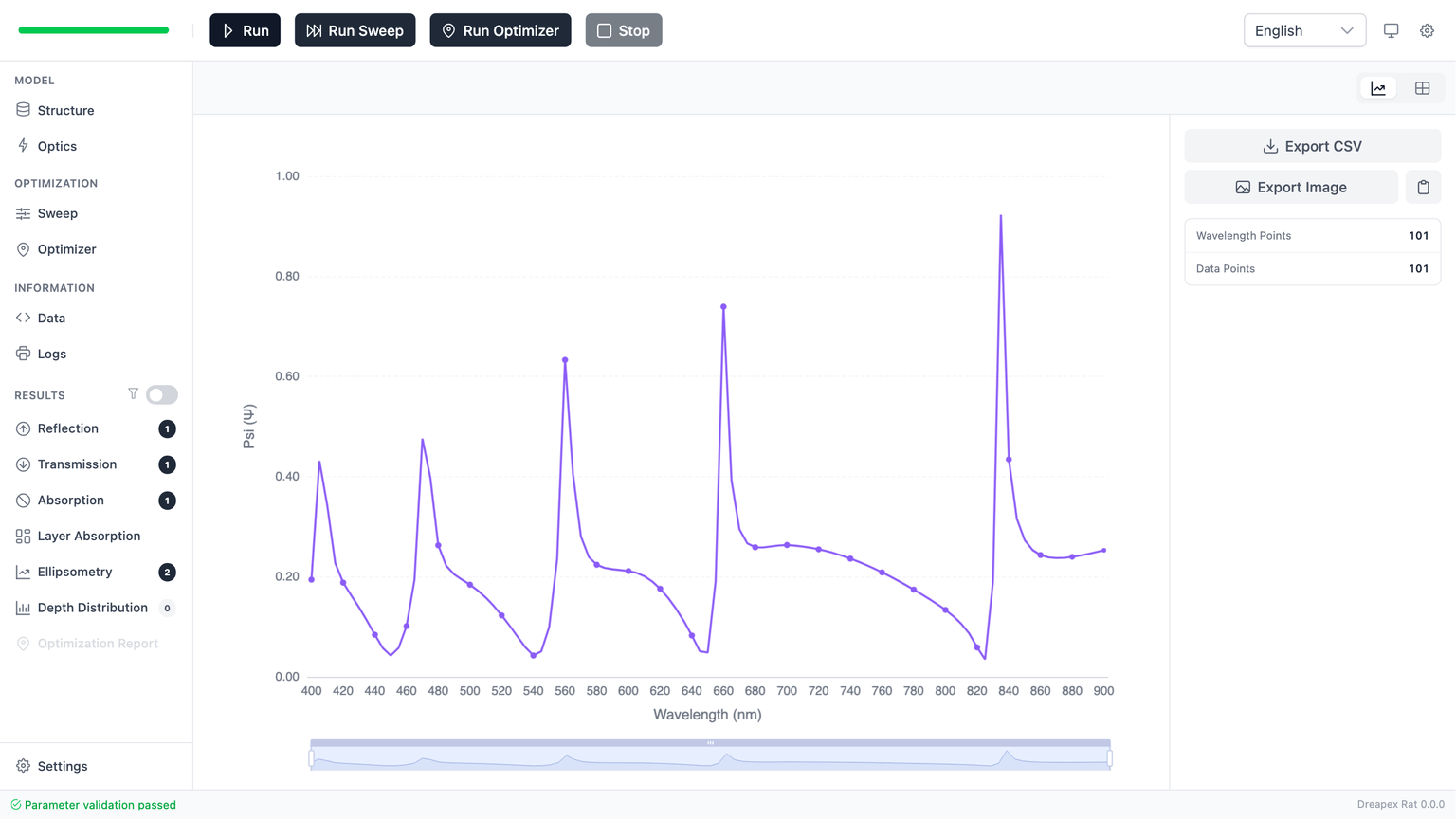
Check the following:
- decide whether the overall trend is rising, falling, or nearly flat
- identify any knees, plateaus, peaks, or valleys in the wavelength band that matters
- map that behavior back to the structure and decide whether the change looks global or localized
Common interpretation patterns:
- an almost uniform vertical shift often points to a more global parameter change, such as average thickness or dominant refractive-index level
- a local feature moving within a limited band usually means the interference condition itself has shifted
If you are fitting to a target, compare the shape in the critical band first, not just a single wavelength point.
Delta page
Delta is the phase-difference result, so it is often more sensitive to thickness, interfaces, and dispersion than Psi.
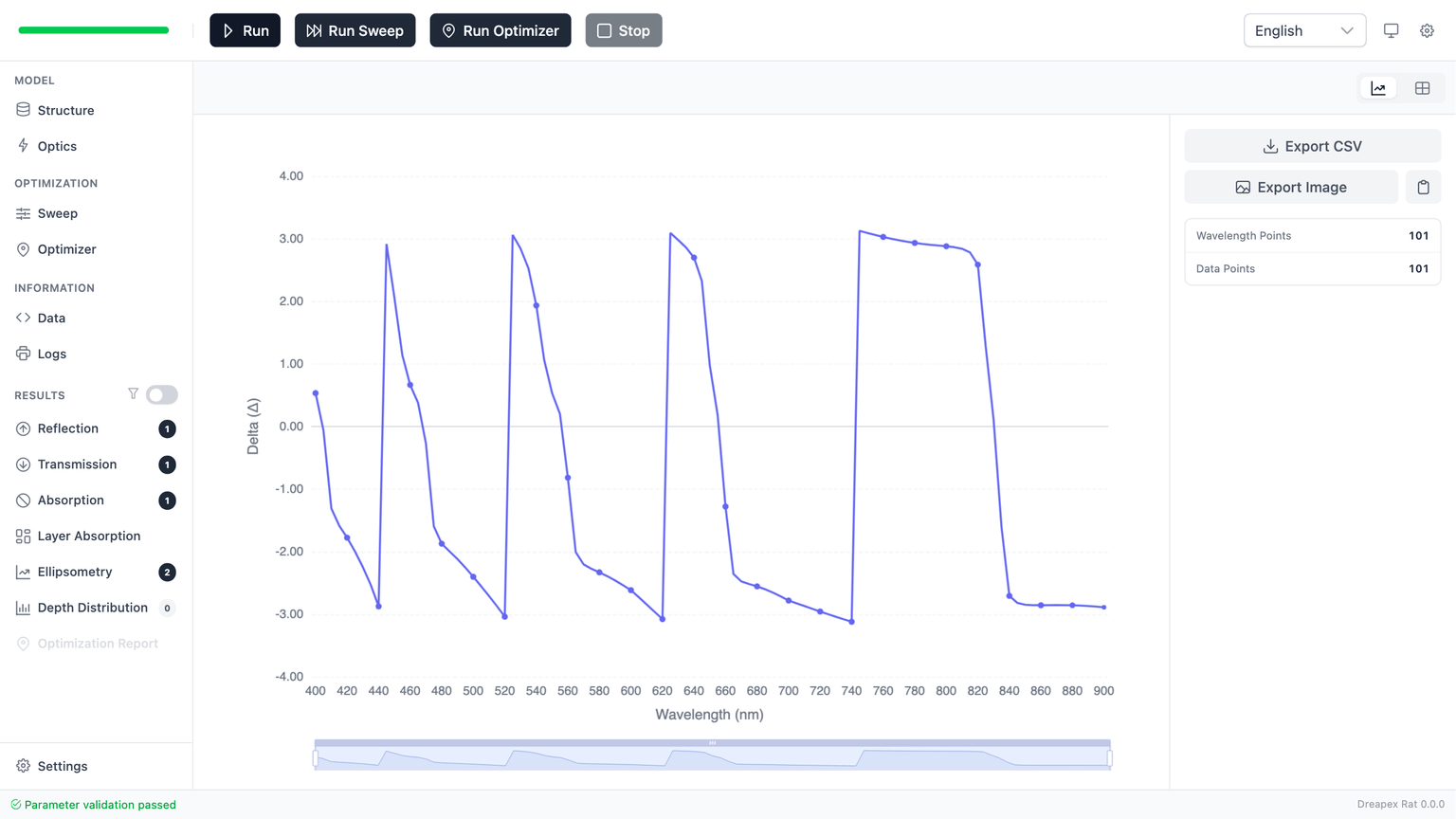
When reading Delta, focus on:
- whether the curve stays continuous
- where the slope accelerates or relaxes
- whether the feature positions move in sync with
Psi
Compared with Psi, Delta more often shows:
- a larger visible response from a smaller parameter change
- sharper local features in narrow wavelength bands
- stronger sensitivity to fitting mismatch
That is why Delta is often the stricter curve during parameter inversion. It tends to reveal disagreement between model and target earlier.
Comparing Psi and Delta
Reading only Psi or only Delta is risky. The safer workflow is to treat them as two projections of the same physical response.
Combined interpretation:
Psi: judge the broad amplitude-side behaviorDelta: verify whether the phase-side behavior shifts with it- if both curves move in the same wavelength region, a core interference condition is probably shifting
- if only one curve changes strongly, the active parameter may affect amplitude and phase asymmetrically
A practical fitting order is:
- use
Psito lock the broad direction - use
Deltato tighten the fine adjustment
Delta usually constrains the solution more strongly, but it is also more sensitive to small mismatch.
Sweep mode
Psi / Delta reuse the same result container logic as the basic result pages, so they follow the same view-switching rules.
The current implementation is:
| Case | When the app forces a table |
|---|---|
Scalar results (Single / Average) | sweep parameter count > 3 |
| Non-scalar results (includes wavelength dimension) | sweep parameter count > 2 |
Display rules:
- if you are sweeping wavelength and the sweep has more than 2 parameters, the chart can disappear and only the table remains
- in scalar mode, the app tolerates one extra dimension and only forces a table once the sweep exceeds 3 parameters
So if the chart/table toggle disappears, check the sweep dimensionality first. That is usually expected behavior.
Parameters to inspect first
If you are using ellipsometry to infer the stack, these are usually the first parameters worth testing:
- Film thickness
Thickness changes move interference features directly, so they often shiftPsi / Deltaknees, peaks, and valleys. - Refractive-index dispersion
If the material file or dispersion model is inaccurate, the mismatch often appears as a wavelength-dependent offset rather than a simple global shift. - Incident angle
Ellipsometry is highly angle-sensitive. Confirm that the angle inOpticsis the intended one before interpreting the curves.
A stable fitting order is usually:
- lock the incident angle and wavelength range
- use
Psito establish the broad match - use
Deltato tighten the detail - only question the material model or stack topology after both curves refuse to align
Common errors and checks
No data after enabling Psi/Delta
Check these first:
- whether you actually ran
Run - whether at least one of
PsiorDeltais enabled - whether any enabled layer in the structure is still incoherent
Validation error after enabling Psi/Delta
This is usually not a chart problem. It means the app is blocking the combination of ellipsometry detectors with incoherent layers.
Check these first:
- top-level regular layers marked
Incoherent Layer Groupinternal layers markedIncoherent
As long as one enabled incoherent layer remains, the validation error will continue.
Small visible differences
Do not keep guessing from the chart. Instead:
- switch to the table view and read exact values at the critical wavelengths
- narrow the wavelength range to the band you care about
- compare it against
Reflectance / Transmittancein the same band
Mismatched Psi and Delta trends
That is not automatically an error. It often means:
- the current parameter affects amplitude and phase differently
- the model is more sensitive in one response channel than the other
Do not draw conclusions from one curve alone. Read both as a pair.
Next step
For sweep strategies and parameter-sensitivity analysis with Psi / Delta, see Ellipsometry Analysis. For local field and absorption position analysis, see Depth Detector Analysis.