Data Import and Export
This guide covers importing and exporting material, incident-spectrum, and result data, as well as inspecting the current model in the Data page. You will learn the required formats, validation rules, and common error handling.
Scope of this chapter
| Function | Problem it solves | Main entry point |
|---|---|---|
| Refractive-index import | Load measured or tabulated material data into the structure model | Structure page in File mode |
| Refractive-index database | Select materials from the built-in refractiveindex.info catalog | Database button in File mode on the Structure page |
| Refractive-index interpolation | Control how RI data are interpolated between data points | Interpolation dropdown in File mode on the Structure page |
| Incident-spectrum import | Load a custom source spectrum into optics settings | Optics page with Incident Spectrum = File |
| Result export | Export calculation, sweep, or cleaned source data | Result pages and related action menus |
Data page | Inspect the current model as JSON-like structured data | Sidebar Data |
.tmm.json model file | Import / export the full model in one step | Top-toolbar Import and Export controls; see Model File Import / Export |
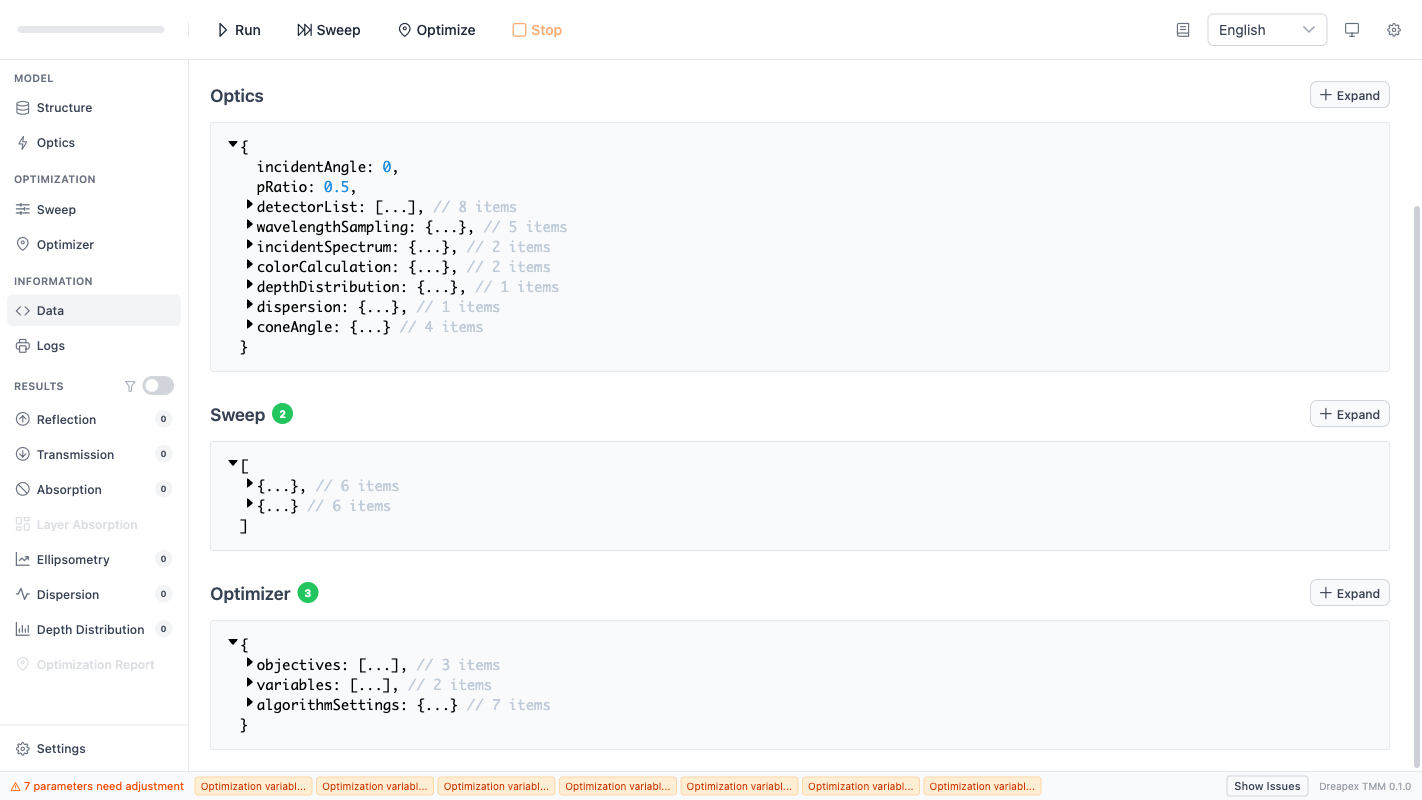
The Data page displays the internal data structure of the current model configuration and calculation results in JSON format.
Refractive-index files: format and import rules
The current parser accepts .nk and .txt. The file is read as a sequence of comment lines and data rows.
| Rule | Current implementation |
|---|---|
| Comment lines | Start with #; imported into description |
| Separators | Spaces, tabs, or commas |
| Supported column counts | 2, 3, or 5 |
| 2-column format | wavelength n, with k automatically filled as 0 |
| 3-column format | wavelength n k |
| 5-column format | wavelength n k nExt kExt, treated as birefringent data |
| Wavelength order | Data are sorted into ascending wavelength order after parsing |
The file does not need to be pre-sorted. The parser reorders all arrays together and preserves row alignment.
Hard validation rules for refractive-index files
| Check | Current requirement | Common failure cause |
|---|---|---|
| Data presence | wavelength / n / k must contain at least one valid row | Comments only, no numeric rows |
| Numeric validity | All values must be finite; no NaN / Infinity | Text, invalid symbols, malformed columns |
| Wavelength | Must be > 0 and strictly increasing | Duplicated or descending wavelengths |
n | Must be > 0 | Placeholder zeros or invalid data cleanup |
k | Must be >= 0 | Negative extinction values |
| Birefringent extension | If the file is recognized as birefringent, valid nExt / kExt must also exist | Missing or invalid extended columns |
Refractive-index file format
# ITO measured data
# source: ellipsometry fit
400 1.95 0.12
500 1.90 0.10
600 1.87 0.09
For a birefringent file:
# Birefringent sample
400 1.70 0.00 1.75 0.00
500 1.69 0.00 1.74 0.00
600 1.68 0.00 1.73 0.00
Refractive-index database as a data source
In addition to local file upload, the File mode on the Structure page provides a Database button that opens the built-in refractiveindex.info material catalog. Database materials are stored in the same data structure as uploaded files, but they retain a database link that enables version tracking and updates.
For database material management, see Structure Configuration - Refractive-Index Database and Structure Configuration - RI Status Check.
Refractive-index interpolation methods
When a layer or surrounding medium loads refractive-index data via File mode, the software must interpolate between data points to obtain index values at arbitrary wavelengths. The Interpolation dropdown provides three methods:
| Method | Characteristics | Recommended use |
|---|---|---|
Linear | Straight-line segments between adjacent points; fastest but not smooth | Very dense data points, or rough estimates only |
PCHIP | Piecewise Cubic Hermite Interpolating Polynomial; preserves monotonicity, no overshoot | Recommended default for most material data |
Cubic Spline | Cubic spline with C2 continuity; smoothest curve | Sparse data where smooth behavior is expected; may overshoot at sharp features |
Linear interpolation and recommends switching to PCHIP. For production calculations, PCHIP is the recommended default.Wavelength coverage check
Before running a calculation, the software automatically verifies that the refractive-index data wavelength range of every File-mode layer and surrounding medium fully covers the wavelength sampling range configured in the Optics page. If any layer fails this check, the run is blocked.
The error message format is: {layer name}: Refractive Index (RI) data range {dataFrom}–{dataTo} nm does not cover Wavelength Sampling {reqFrom}–{reqTo} nm.
Corrective actions:
- Replace the refractive-index material with one that has a wider wavelength range.
- Or reduce the wavelength sampling range in the
Opticspage so that it falls within the existing data's valid interval.
Incident-spectrum files: format and import rules
The current parser accepts .txt and .pl. Unlike refractive-index files, incident-spectrum files must contain exactly two columns.
| Rule | Current implementation |
|---|---|
| Comment lines | Start with #; imported into description |
| Separators | Spaces, tabs, or commas |
| Column count | Must be exactly 2 |
| Data format | wavelength intensity |
Hard validation rules for incident-spectrum files
| Check | Current requirement | Common failure cause |
|---|---|---|
| Data presence | At least one valid numeric row is required | Comments only or empty file |
| Column count | Each row must contain exactly 2 columns | Extra unit or note columns |
| Numeric validity | All values must be finite | Text or malformed numeric values |
| Wavelength | Must be > 0 and strictly increasing | Descending or repeated wavelengths |
| Intensity | Must be non-negative | Negative intensity or invalid normalization |
Incident-spectrum file format
# Custom LED spectrum
400 0.12
450 0.45
500 0.92
550 1.00
600 0.61
If Visible Color will also be enabled later, make sure this spectrum is consistent with the active wavelength sampling range, or the color calculation will be blocked by the wavelength-range rules.
Export: result data and round-trip source data
The app currently supports two export categories.
| Type | Current capability | Typical use |
|---|---|---|
| Result export | Result pages export CSV; sweep exports expand by parameter combination | Post-processing, fitting, reporting |
| Source-data export | Refractive-index and incident-spectrum data can be exported as CSV / TXT | Round-trip editing with external tools |
Important behaviors of source-data export:
- Refractive-index and incident-spectrum exports are validated again before download.
descriptionis written back as# commentlines so the exported file remains compatible with the import parser.- Birefringent refractive-index exports preserve
nExt / kExt. TXTexport uses a plain-text layout that can be imported again directly.
Result CSV interpretation:
- Regular calculation results export as
Wavelength_nm, Value; - Sweep CSV exports parameter columns first, then wavelength columns;
- Sweep CSV is meant for batch comparison, not as a simple single-curve file.
The Data page: inspect the active model directly
The Data page is not a result page. It exposes the current frontend model state as structured data.
| Panel | Current content | Best use case |
|---|---|---|
Structure | Current structure array | Verify layer order, names, and pre-expansion stack content |
Optics | Current optics object | Verify wavelength mode, detectors, and spectrum toggles |
Sweep | Current sweep list | Verify paths, ranges, and steps |
Optimizer | Objectives, variables, and algorithm settings | Verify optimization configuration before running |
Each panel supports expand/collapse. Use it in these situations:
- after importing a file, confirm the data actually landed in the intended field;
- when sweep or optimizer reports a path issue, verify the exact path names in the structured data;
- before saving or documenting an example case, confirm that the model state matches the intended setup.
Troubleshooting order
When import succeeds but the result still looks wrong, use this order:
- check that the source file has a strictly increasing wavelength column and consistent units;
- use the
Datapage to verify array lengths and key fields after import; - return to
StructureorOpticsand confirm the imported data are actually enabled in the active model.
The check order is: format -> binding -> modeling.