Simulation Analysis
This overview explains how detectors, Sweep, and Optimizer work together for structural optimization and physical analysis. A detector defines the quantity to observe; Sweep shows how thickness, angle, or polarization changes that quantity; and Optimizer searches for a structure that satisfies target objectives. The following guides cover R/T/A and layer absorption, spectrum and color, ellipsometry, depth distribution, and dispersion analysis.
After reading, you can choose detectors for a design question, define Sweep variables or Optimizer objectives, compare parameter effects, read optimization results, and return to Results to verify the selected structure and its physical interpretation.
Chapter Responsibilities
| Chapter | Scope |
|---|---|
| Basic Optical Results | Definitions, prerequisites, and chart reading for R / T / A / Layer Absorption |
| Spectrum and Color Analysis | Spectral results, color results, incident spectrum, and visible-color settings |
| Ellipsometry Results | Definitions, coherence requirements, and chart modes for Psi / Delta |
| Depth Distribution Results | Definitions, views, and data thresholds for Poynting Vector / Absorption Density / Electric Field / Refractive Index |
Analysis | Problem identification, detector selection, sweep strategy, optimization entry, and result back-checking |
Case Studies | Full configurations, runs, sweeps, optimizations, and result interpretation for specific applications |
Standard Workflow
| Step | Page | Output |
|---|---|---|
| 1 | Structure, Optics | Baseline stack, detector set, wavelength mode, angle, polarization, and cone angle conditions |
| 2 | Run + Results | First result set and initial problem classification |
| 3 | Sweep | One-parameter, two-parameter, or multi-parameter trends and stability windows |
| 4 | Optimizer | Direct optimization when the target belongs to R / T / A; goal types include Scalar, Curve Fit, and Color Match |
| 5 | Results | Validation of optimized system-level, layer-level, or depth-resolved behavior |
| 6 | Case Studies | Full workflows for specific application scenarios |
Baseline Example
The screenshots in this chapter use one consistent baseline stack. The same baseline makes it possible to compare Run, Sweep, and Optimizer without changing the physical model.
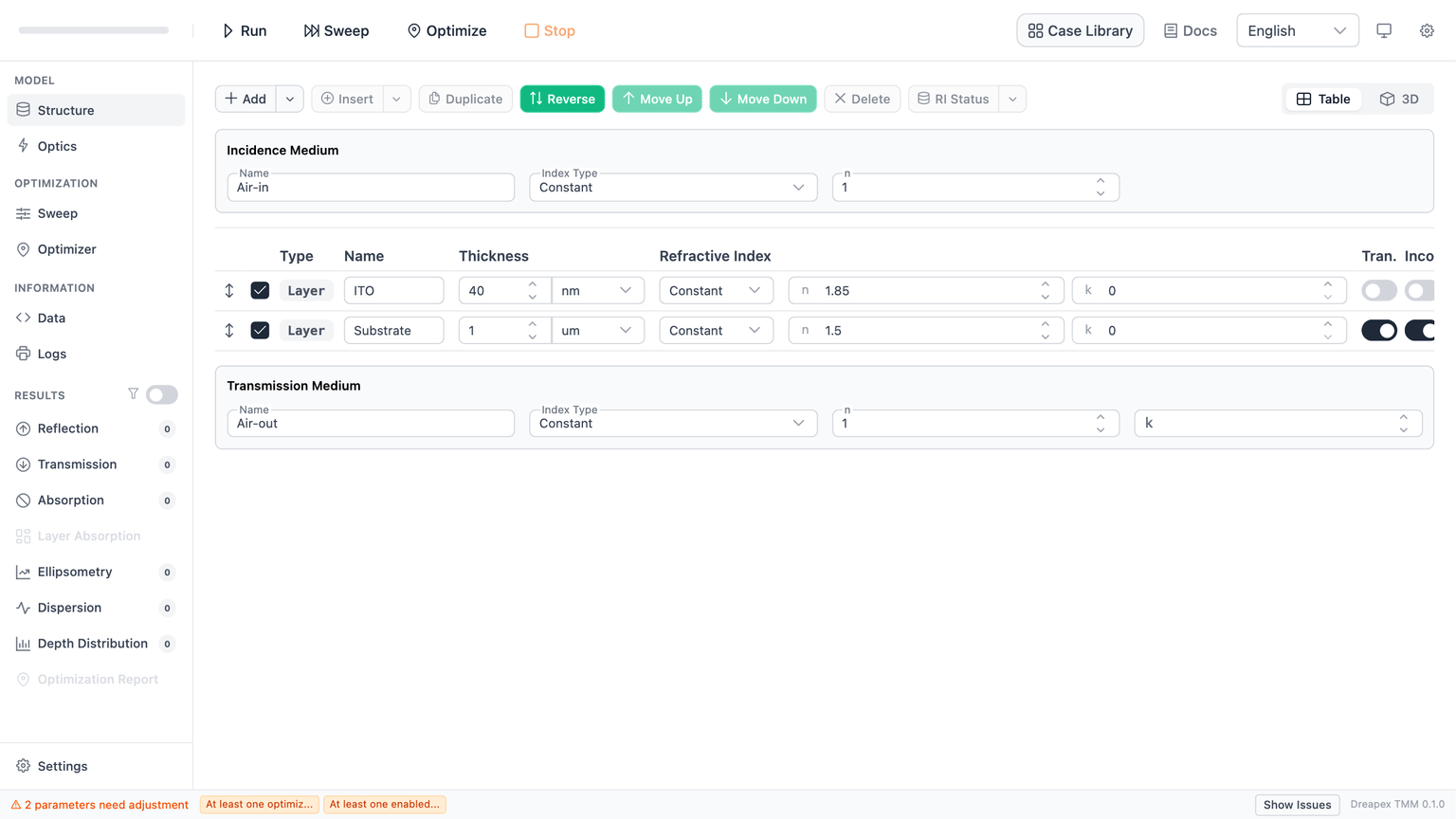
| Item | Setting |
|---|---|
| Structure | ITO 40 nm + Substrate 1 um |
| Incidence medium | Air-in, n = 1 |
| Transmission medium | Air-out, n = 1 |
| Wavelength sampling | 400-900 nm, step 20 nm or 10 nm, depending on the figure |
| Base detectors | Reflectance, with additional Transmittance / Absorptance / Layer Absorption where needed |
| Additional sweep parameters | structure.ITO.thickness, optics.incidentAngle, optics.pRatio |
Result Types and Analysis Entry
| Problem type | Primary results page | Analysis entry |
|---|---|---|
| Reflection, transmission, total absorption, layer absorption | Basic Optical Results | RTA and Layer Absorption Analysis |
| Spectral shape, color stability | Spectrum and Color Analysis | RTA and Layer Absorption Analysis |
| Polarization response, thickness sensitivity, angle sensitivity | Ellipsometry Results | Ellipsometry Analysis |
| Energy flow, local absorption, field enhancement, in-layer position | Depth Distribution Results | Depth Detector Analysis |
| Pulse broadening, chirp compensation, PMD evaluation, chromatic dispersion | Dispersion results (Phase, GD, GDD, DGD) | Dispersion Analysis |
Sweep Dimensionality and Views
Generic Result Pages
Generic result pages include Reflectance, Transmittance, Absorptance, Psi, Delta, Phase, GD, GDD, DGD, and most pages that output one scalar or one spectrum per run.
| Wavelength mode | Number of Sweep parameters | Typical output | Main views |
|---|---|---|---|
Sweep | 1 | A set of spectra changing with one parameter | Line, Heatmap |
Sweep | 2 | Two-parameter map at a fixed wavelength, with 3D scatter still available | Heatmap, 3D Scatter |
Sweep | 3 or more | Data dimensionality is too high for a chart | Table |
Single or Average | 1 | Scalar result changing with one parameter | Line |
Single or Average | 2 | Scalar result over a two-parameter plane | Line, Heatmap |
Single or Average | 3 | Three-parameter scalar result | 3D Scatter |
Single or Average | 4 or more | Data dimensionality is too high for a chart | Table |
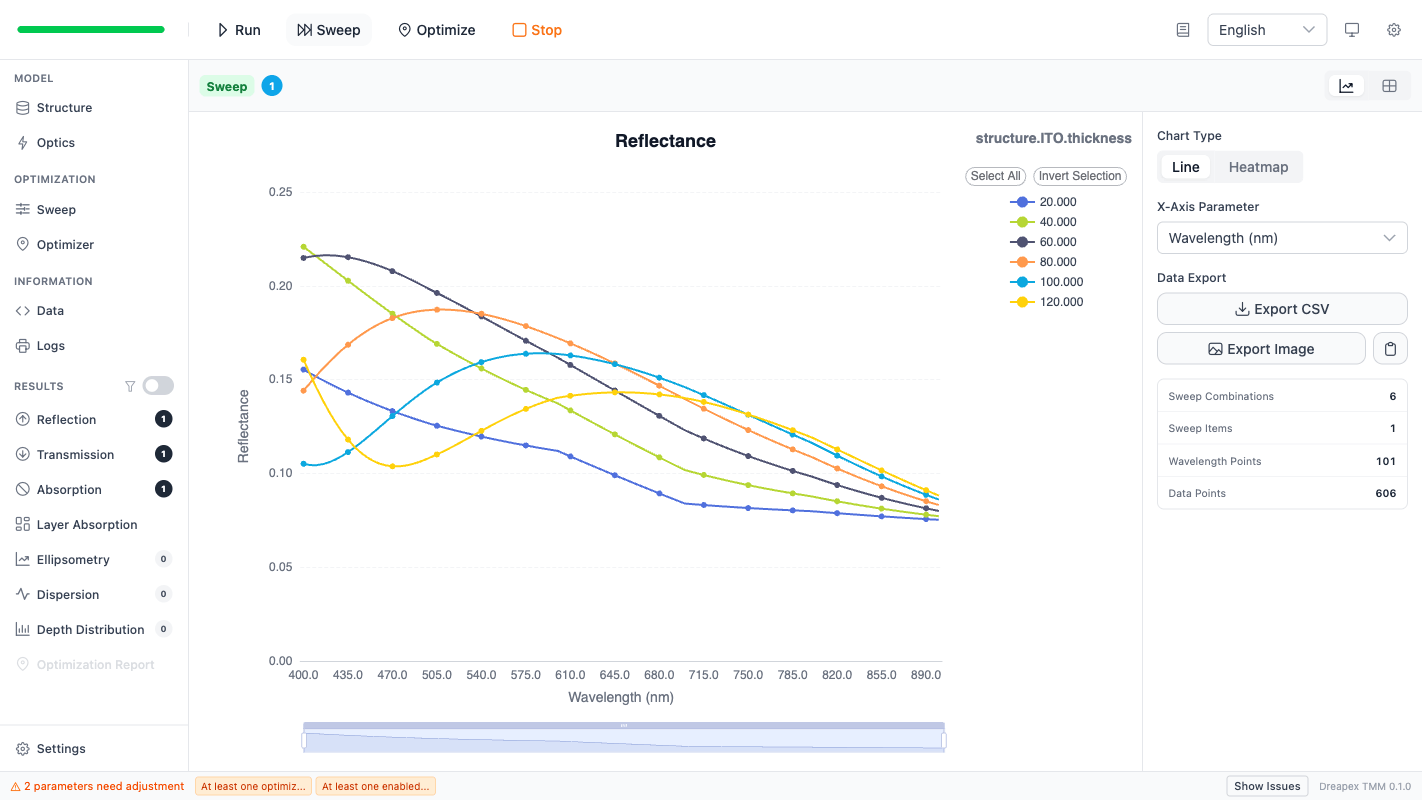
In this figure, Reflectance uses wavelength sweep mode and Sweep contains only structure.ITO.thickness. The result keeps the full spectral axis and exposes both Line and Heatmap.
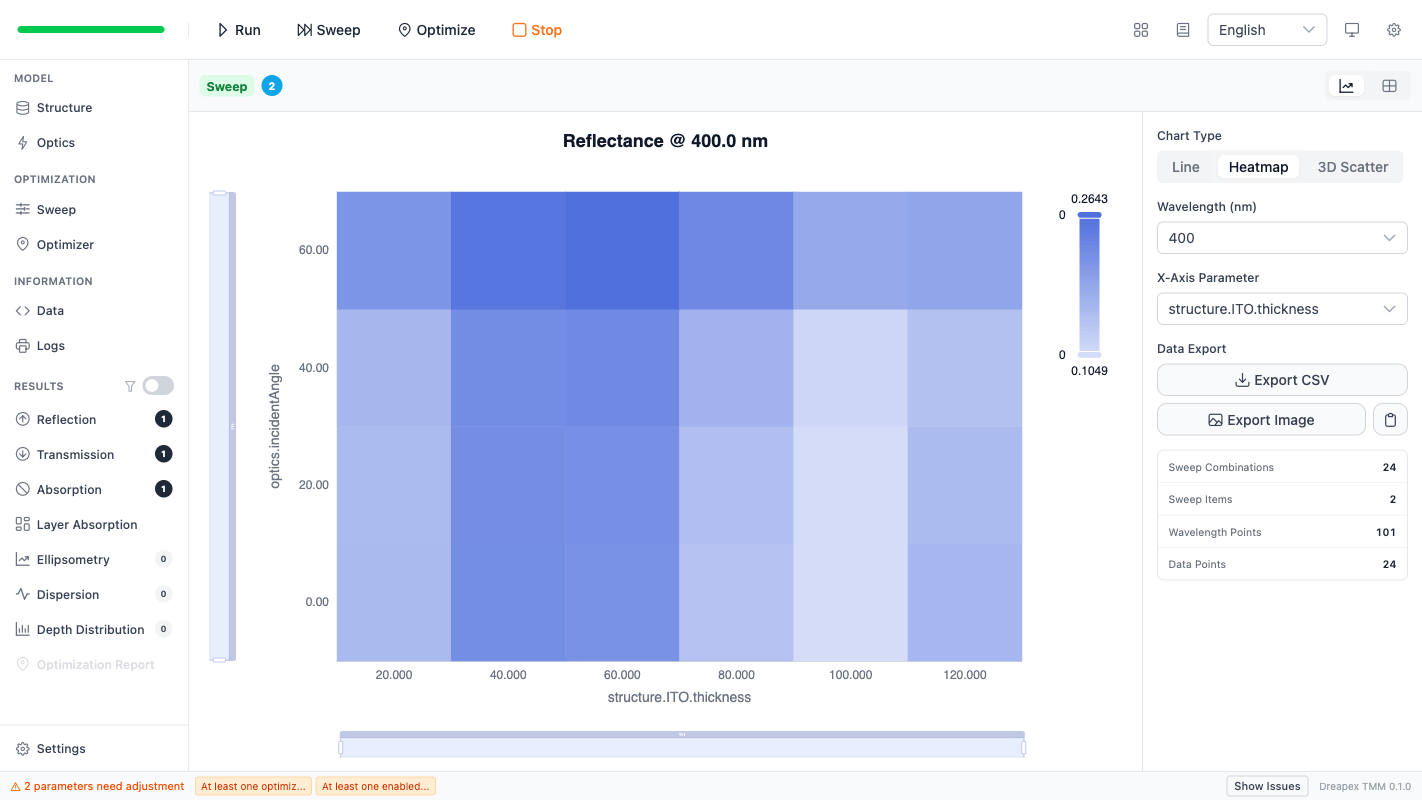
In this figure, Sweep contains both structure.ITO.thickness and optics.incidentAngle. The heatmap fixes one wavelength point and maps the two sweep parameters to x / y axes. This is the primary view for design windows and angle drift.
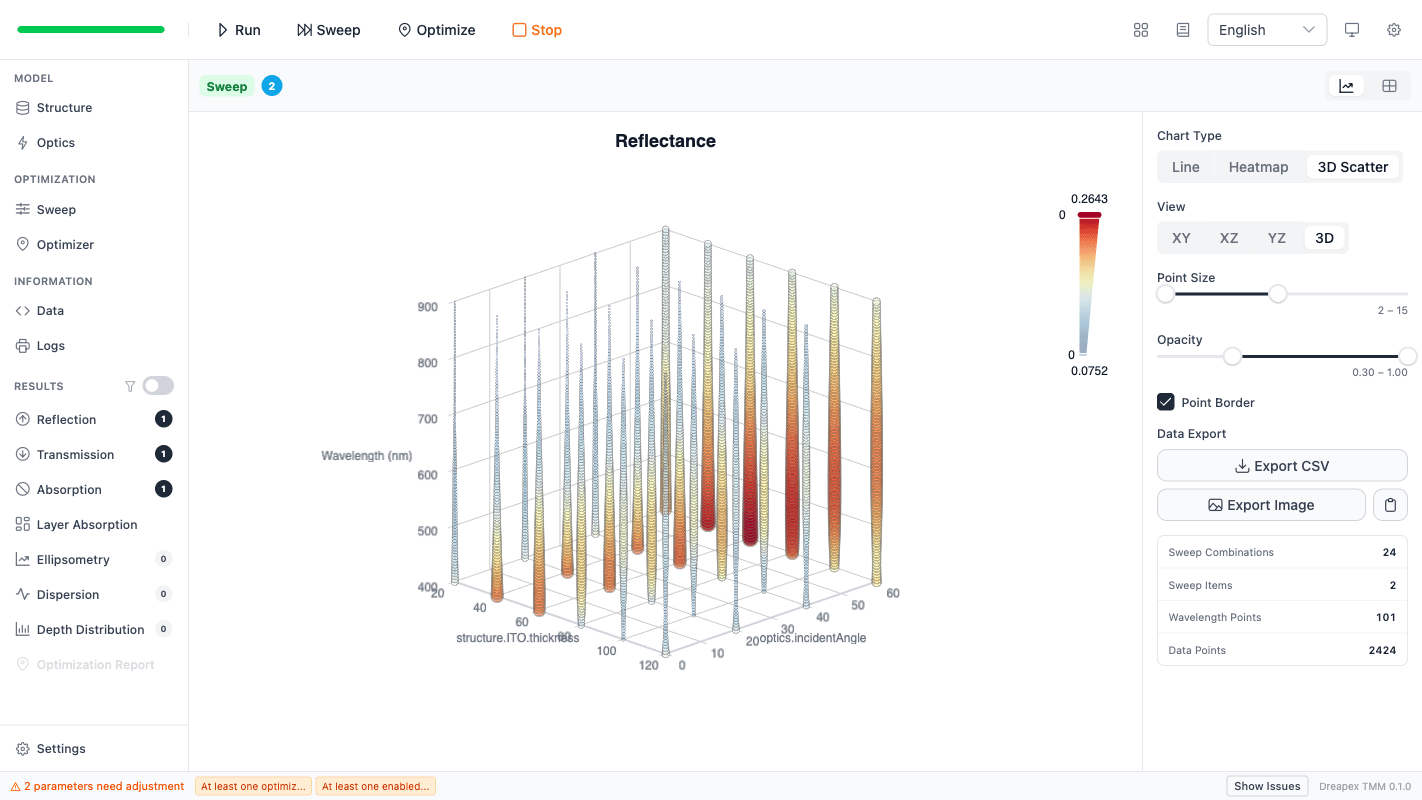
In this figure, the 3D view keeps wavelength / thickness / incidentAngle as axes and uses color for the result value. This view is useful for trend inspection and parameter coupling, not for precise reading.
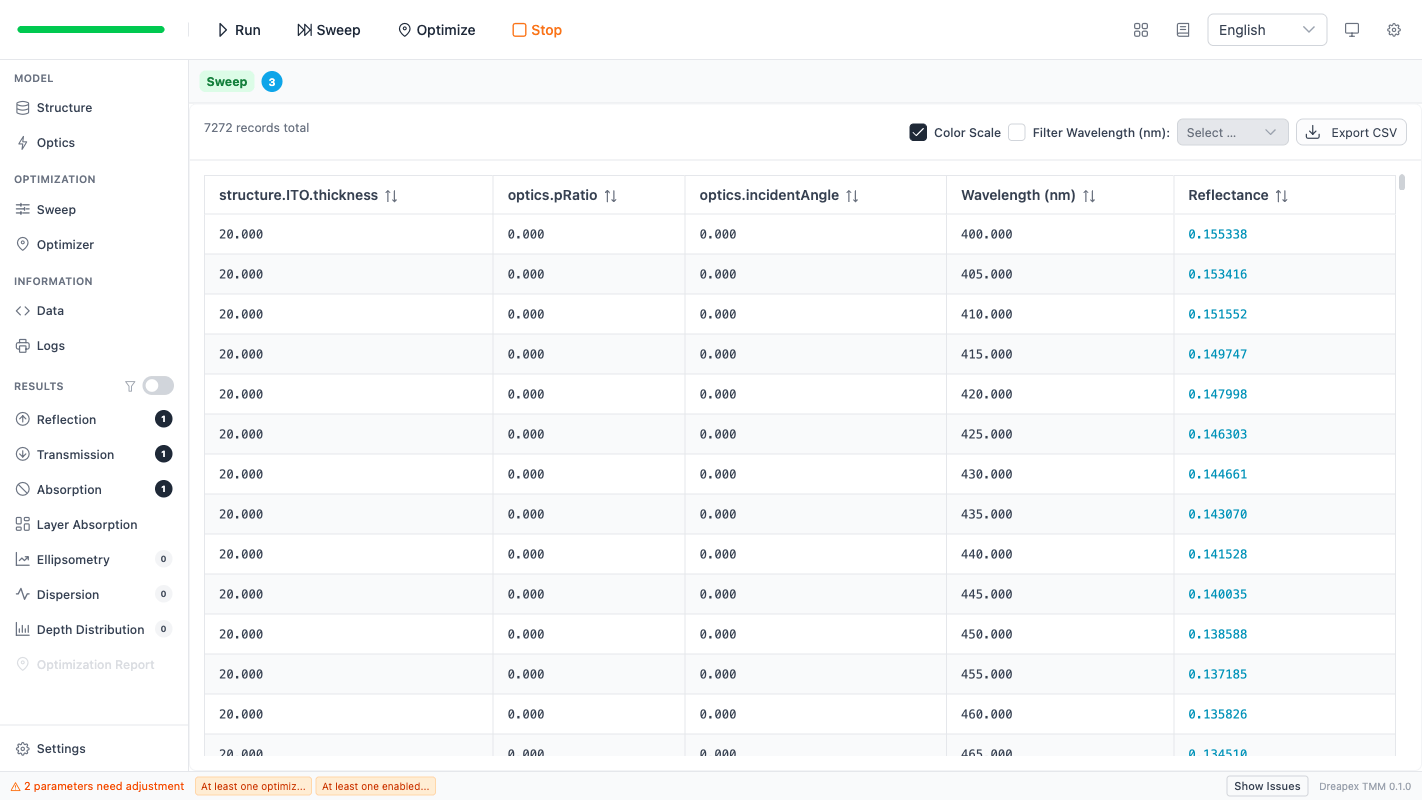
In this figure, Sweep contains structure.ITO.thickness, optics.incidentAngle, and optics.pRatio. The result falls back to a table. Tables are the final output for high-dimensional results.
Layer Absorption
Layer Absorption is a specialized result page with its own view rules.
| Wavelength mode | Number of Sweep parameters | Main views |
|---|---|---|
Sweep | 1 | Line, Heatmap, 3D Bar |
Sweep | 2 | 3D Scatter or table, depending on result dimensionality |
Single or Average | 1 | Stacked Area, Line |
Single or Average | 2 | Line, Heatmap, 3D Bar |
Single or Average | 3 or more | 3D Scatter or Table |
Layer Absorption includes both layer index and result value. Charts are suited for viewing the overall absorption distribution across layers. Exact comparison should use exported tables.
Depth Distribution Results
Depth distribution pages include Poynting Vector, Absorption Density, Electric Field, and Refractive Index. These pages carry an additional depth axis and therefore use another view logic.
| Wavelength mode | Number of Sweep parameters | Main views |
|---|---|---|
Single | 0 | Line |
Sweep | 0 | Line, Heatmap |
Sweep | 1 | Line, Heatmap, 3D Scatter |
Single | 1 | Line, Heatmap, 3D Scatter |
Single or Average | 2 | 3D Scatter or Table |
Depth results usually require a selected wavelength before Heatmap or 3D Scatter becomes meaningful. The right-side control panel exposes that selection explicitly.
Reading Sweep Outputs
| Scenario | Preferred view | Main information |
|---|---|---|
| One parameter, spectral drift | Line | Peak/valley position, crossings, overall rise or drop |
| One parameter, stability window | Heatmap | Smooth regions, sensitive regions, moving bands |
| Two parameters, design window | Heatmap | Optimal zones, band-edge drift, angle stability |
| Two parameters, multidimensional trend | 3D Scatter | Coupling, local extrema, outliers |
| Three or more parameters | Table | Filtering, sorting, export, downstream processing |
Cone Angle Averaging
When Cone Angle is enabled in Optics, the solver averages results over a range of incident angles defined by the cone half-angle, f-number, or numerical aperture. This feature applies only to R, T, A, and Layer Absorption detectors. Ellipsometry, depth distribution, and dispersion detectors are not affected.
Conditions for Using the Optimizer
| Condition | Current requirement |
|---|---|
| Target quantity | R / T / A (via Scalar, Curve Fit, or Color Match goals) |
| Goal types | Scalar: maximize, minimize, or target a single value; Curve Fit: match a user-defined spectral shape; Color Match: match a target CIE LAB color |
| Algorithms | TRF, L-BFGS-B, Nelder-Mead |
| Search modes | Local optimization, Grid Search + Local optimization |
| Variable groups | Mainly structure and surroundings |
| Independent incident light | Each objective can specify its own incident light conditions |
| Entry | Run Optimizer |
| Validation | Return to Results and check side effects |
The following targets should not be described as direct optimization workflows in the current implementation:
Psi / DeltaPhase / GD / GDD / DGD- depth-resolved field distributions
- in-layer local absorption position
Chapter Entry Points
- RTA and Layer Absorption Analysis
- Ellipsometry Analysis
- Depth Detector Analysis
- Dispersion Analysis
- Case Studies
Next Step
Start with RTA and Layer Absorption Analysis for system-level problems. Move to Ellipsometry Analysis for polarization-response problems. Move to Depth Detector Analysis for local-field or local-absorption problems. Move to Dispersion Analysis for pulse broadening, GDD compensation, or PMD evaluation.